Iterating through a string and finding double letters.
A GCSE Computer Science walkthrough: loop through a string by index, compare each letter with the next one, and avoid an Index Error
By Hashir Ali, , 6 min read
This week I worked through a GCSE programming question with one of my students: write a function that returns True if a word contains the same letter twice in a row, like the "ll" in "hello". It looks simple, but it tests three things examiners love: looping through a string by index, comparing neighbouring characters, and knowing exactly where a loop should stop.
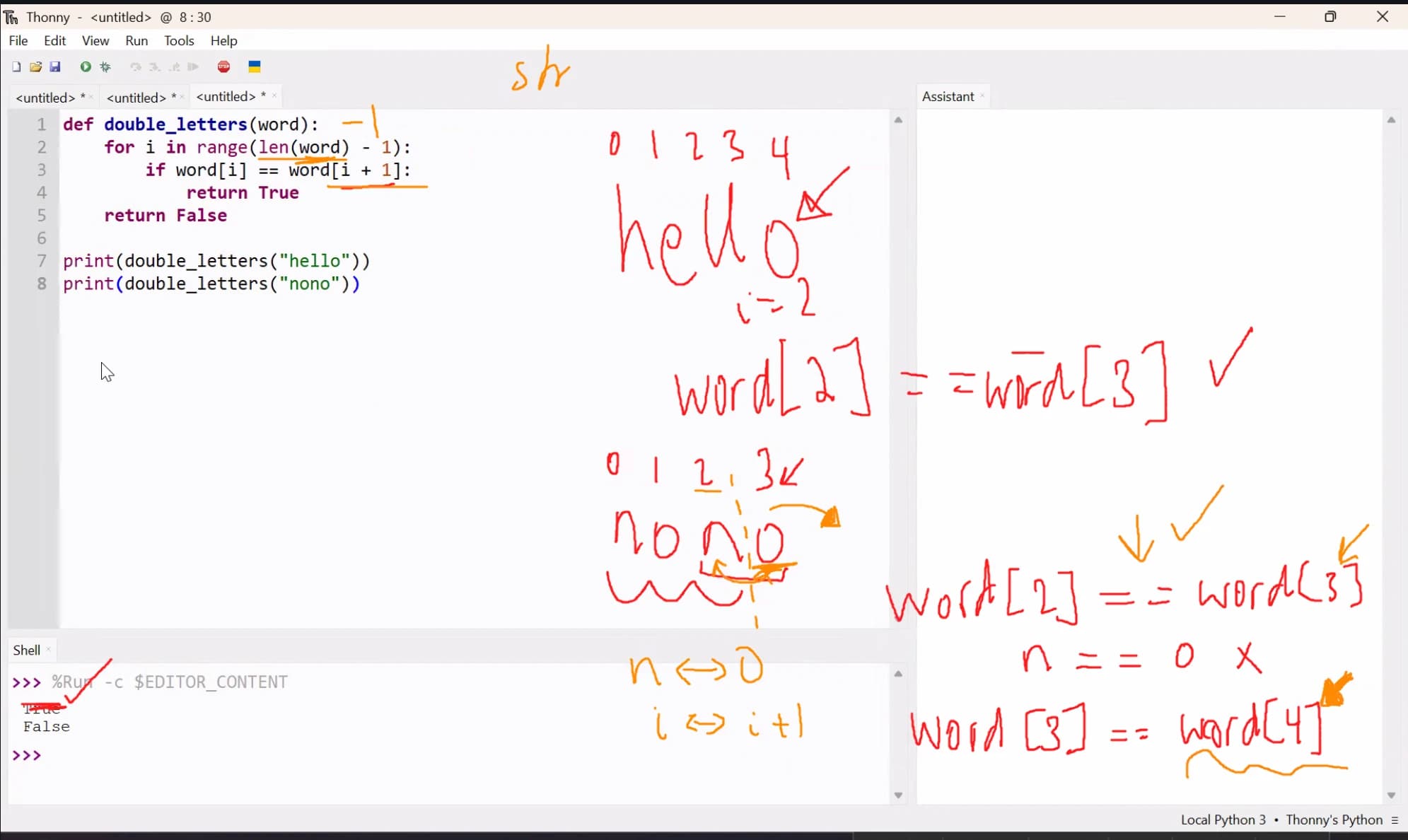
word[i] with word[i + 1] pair by pair.The idea is to stand on each letter in turn and ask one question: is the letter next to me the same as me? If the answer is ever yes, we can stop straight away and return True. Only once every pair has been checked do we return False.
The solution
def double_letters(word):
    for i in range(len(word) - 1):
        if word[i] == word[i + 1]:
            return True
    return False

print(double_letters("hello"))  # True
print(double_letters("nono"))   # False
Why range(len(word) - 1)?
empty
"hello" has indexes 0 to 4, and there is nothing at word[5]. Each check looks one letter ahead with word[i + 1], so i must stop at 3: the last check is word[3] with word[4]. Let i reach 4 and Python looks for word[5], giving an IndexError.
Tracing it by hand
Exam questions often ask you to complete a trace table, and tracing is also the fastest way to convince yourself the code works. Here's "hello":
| i | word[i] | word[i + 1] | Same? |
|---|---|---|---|
| 0 | h | e | No |
| 1 | e | l | No |
| 2 | l | l | Yes: return True |
The function returns as soon as it finds the double "l" at index 2, so index 3 is never checked. Now "nono", where the letters repeat but never sit next to each other:
| i | word[i] | word[i + 1] | Same? |
|---|---|---|---|
| 0 | n | o | No |
| 1 | o | n | No |
| 2 | n | o | No |
Every pair has been checked with no match, so the loop finishes and the function returns False. This is a good test case to remember: a word can contain the same letter twice without having a double letter.
Two mistakes I see all the time
1. Looping one step too far
def double_letters(word):
    for i in range(len(word)):        # goes one step too far
        if word[i] == word[i + 1]:    # IndexError on the last letter
            return True
    return False
Using range(len(word)) makes the loop reach the last letter, and word[i + 1]then raises IndexError: string index out of range. Sometimes it seems to work, because a word like "hello" returns before the loop ever reaches the end, which is why testing with a word that has no double letters matters.
2. Returning False too early
def double_letters(word):
    for i in range(len(word) - 1):
        if word[i] == word[i + 1]:
            return True
        else:
            return False    # gives up after checking only the first pair
An else: return False inside the loop means the function gives up after the very first pair. "hello" would wrongly return False because "h" and "e" are different. The return False belongs after the loop, once every pair has been checked.
Try it yourself
Adapt the function so it counts how many double letters a word contains instead of returning True or False. For example, "bookkeeper" should give 3 ("oo", "kk" and "ee"). Hint: you'll need a counter variable, and the return can no longer go inside the loop.
Key takeaways
- Loop by index with
range(len(word) - 1)whenever you compare each item with the next one. - Return
Trueas soon as you find a match, andFalseonly after the loop. - Always test with a word that has no match, like "nono", to catch both mistakes above.
Questions like this come up again and again at GCSE. If your child would like help building confidence with programming questions, take a look at our programming lessons.