Understanding Linked Lists
An OCR A-Level Computer Science walkthrough: what a linked list is, and how to remove and add nodes by changing pointers
By Hashir Ali, , 3 min read
In this week's A-Level lesson we worked through an OCR exam question on linked lists. A coach company stores the cities on a tour in order: London, Oxford, Birmingham, Manchester. The tour changes, so Birmingham has to be removed and York added to the end. It's a 4-mark question, and every mark comes from describing a pointer change precisely.

What is a linked list?
A linked list is a dynamic data structure made of nodes. Each node holds two things:
- data, such as the name of a city
- a pointer giving the location of the next node
A separate head pointer stores where the list starts, and the last node's pointer is null to mark the end. Because the order comes from the pointers, not from where the nodes sit in memory, you can add and remove items without shuffling any data around.
For a 3-mark "describe" question, those three points are the answer: dynamic, data and pointer in each node, and the pointer giving the location of the next node.
Removing a node
To remove Birmingham:
- Traverse from the head until you reach the node before Birmingham, which is Oxford.
- Change Oxford's pointer to Birmingham's pointer, so it now points to Manchester.
Notice that Birmingham isn't deleted or overwritten. It simply can't be reached any more, and its space can be returned to the free list (or tidied up by garbage collection) to be reused later.
Adding a node
To add York to the end of the tour:
- Create a new node holding "York" in the next free space in memory.
- Manchester stays where it is, but its pointer changes from
nullto point to York. - York's pointer is set to
null, because it is now the last node.
Adding in the middle works the same way, but order matters: set the new node's pointer to the next node first, then point the previous node at the new one. Do it the other way round and you lose the only link to the rest of the list.
The mark scheme answer as a diagram
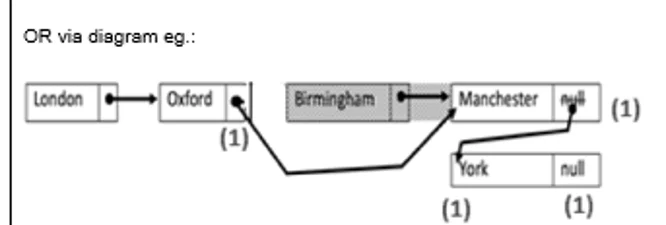
You can also answer this question by drawing on the diagram. Each (1) shows where a mark is awarded: Oxford's pointer going around Birmingham, Manchester's pointer to York, the new York node, and York's null pointer.
Where marks are lost
- Forgetting to create the node. "Manchester points to York" only works if York exists. Say it is created in the next free space.
- Forgetting the null. The new last node needs a
nullpointer, or the list has no end. - Moving data. Nothing shifts position. Only pointers change, which is the whole point of a linked list compared with an array.
- Vague wording. "Birmingham is removed" scores nothing. Say whosepointer changes and what it now points to.
Key takeaways
- Each node holds data and a pointer to the next node; the last pointer is
null. - Remove a node by pointing the previous node at the one after it.
- Add a node by creating it, linking it in, and giving the last node a
nullpointer.
Data structure questions like this turn up on every OCR A-Level paper. If you'd like help turning understanding into full marks, take a look at our exam preparation lessons.